Introducing Exit Time Investigator: New Insights into Vandalism, Incidents and Student Meetups
LeaveLens’ new Exit Time Investigator helps schools identify which students were out of class during a specific incident window, providing valuable investigative leads for vandalism, negative behaviour, potential witnesses and peer meetups.

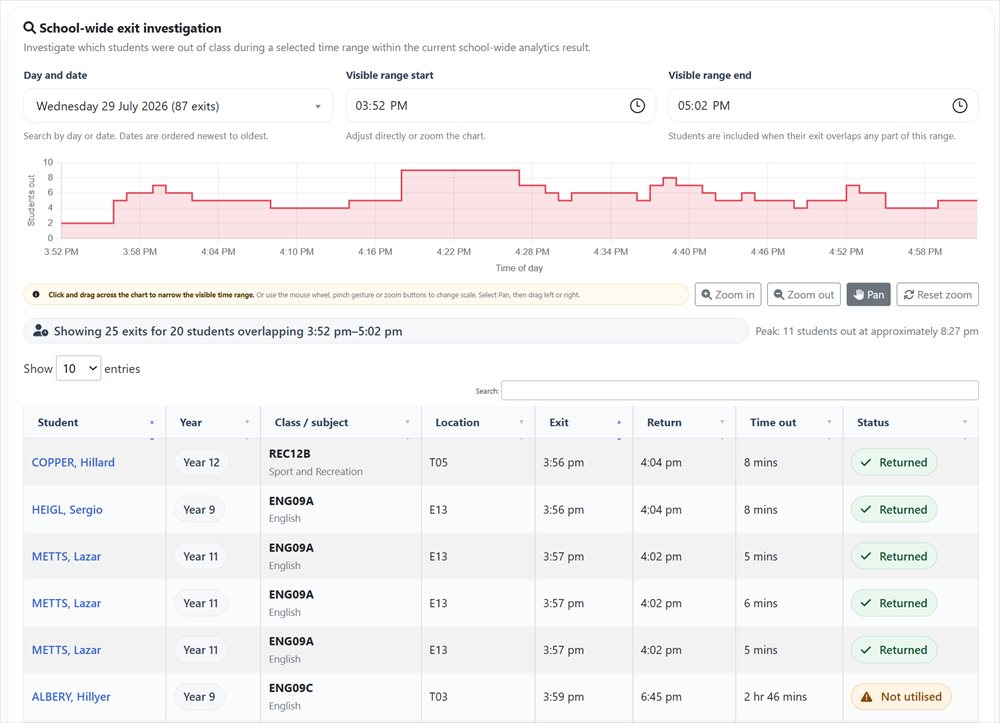
LeaveLens has introduced a powerful new analytics feature designed to help schools investigate what was happening outside classrooms at a particular point in the school day.
The new Exit Time Investigator allows authorised staff to select a date, narrow the timeline to an exact period and immediately identify every student whose recorded classroom exit overlapped that time.
This gives schools a practical new way to investigate incidents such as vandalism, property damage, vaping, unsafe behaviour, student conflict and suspected peer meetups during lesson time.
Investigate vandalism and property damage more effectively
When vandalism or damage is discovered, one of the first challenges is establishing when it may have occurred and who was outside class during that period.
Exit Time Investigator allows school staff to enter or select the estimated incident window and view all students recorded as being out of class at that time.
This can help schools:
- identify students who may have been in the vicinity of the incident
- find potential witnesses who may have seen or heard something relevant
- recognise multiple students who were out at the same time
- compare the incident time with recorded exit and return times
- narrow a broad investigation to a more relevant group of students
The results do not establish that a student was involved in an incident. Instead, they provide time-based investigative leads that can help authorised staff determine who may have relevant information.
Identify potential witnesses to negative behaviour
Significant behaviour incidents do not always occur inside a supervised classroom. They may take place in corridors, toilets, stairwells, shared facilities or other areas of the school while lessons are underway.
By selecting the approximate time of an incident, schools can use Exit Time Investigator to identify students who were recorded as being out of class during the same period.
Those students may include:
- potential witnesses to bullying, conflict or unsafe behaviour
- students who were nearby before or after an incident
- students who may be able to clarify the sequence of events
- students whose movements overlap with those of other students involved
This provides a more structured starting point than relying solely on memory, informal reports or broad questioning across an entire cohort.
Explore possible peer meetups and coordinated exits
Exit Time Investigator also helps schools recognise occasions when multiple students were out of class at the same time.
This may assist when reviewing possible peer meetups, coordinated exits, socialising during lessons, repeated toilet-area gatherings or other patterns involving students leaving separate classrooms during overlapping periods.
The chart displays how many students were simultaneously out of class across the day. Staff can zoom into periods of increased movement and review the individual records contributing to that peak.
This makes it easier to move from a general concern about student movement to the exact students, classes and times associated with the overlap.
See exactly who was out during an incident window
Users can select a date from the current analytics range and then investigate the day using:
- exact start and end time controls
- drag-to-zoom timeline selection
- zoom-in and zoom-out controls
- panning across the school day
- a reset option to return to the complete daily view
The accompanying table updates immediately and includes every exit that overlaps the visible period.
Importantly, a student does not need to have left class during the selected window to appear. A student who exited earlier but remained out during part of the incident period is also included.
Review the context behind each movement record
For every matching exit, LeaveLens displays:
- the student’s name and year level
- the class or subject they exited
- the classroom location
- the recorded exit time
- the recorded return time
- the total time out of class
- whether the exit was returned normally, remained open or was marked as not utilised
Student names link directly to the relevant Student Analytics page while preserving the original analytics date range. This allows staff to move from a specific incident window to a broader review of the student’s classroom-exit history and recurring movement patterns.
Recognise periods of concentrated student movement
The timeline shows the number of students simultaneously out of class throughout the selected day.
LeaveLens also identifies the approximate peak number of students out at the same time. This can help schools recognise periods where corridors, toilets or shared facilities may have experienced unusually high student traffic.
These insights may support reviews of:
- vandalism and property damage
- toilet or changeroom incidents
- vaping concerns
- bullying or student conflict
- unsafe or unauthorised behaviour
- suspected peer meetups
- coordinated classroom exits
- supervision pressures during particular periods
Available across LeaveLens analytics
Exit Time Investigator has been developed as a reusable analytics feature and can be included across multiple LeaveLens views, including:
- live and historical school-wide analytics
- house and year-level analytics
- faculty and subject analytics
- student and teacher analytics
- the LeaveLens Snapshot view
The records shown always reflect the scope of the analytics page being viewed. A faculty investigation therefore examines exits associated with that faculty, while a subject investigation focuses on the selected class or subject.
From broad concern to focused investigation
Schools often know approximately when an incident occurred but lack a reliable way to determine which students may have been nearby.
Exit Time Investigator transforms existing LeaveLens movement records into a focused investigative view. Rather than searching through individual exit records or questioning large groups of students, authorised staff can narrow the day to the relevant period and immediately identify the movements that overlap it.
The feature does not determine responsibility or prove that a student witnessed or participated in an incident. It provides accurate, time-based information that can help schools ask more informed questions, locate potential witnesses and better understand the circumstances surrounding an event.
Turning student movement data into actionable insight
LeaveLens already helps schools measure classroom exits, lost learning time and recurring movement patterns. Exit Time Investigator extends that value by helping schools understand who was outside class during a specific period and how student movements overlapped.
For schools responding to vandalism, negative behaviour or suspected peer meetups, this provides a practical and defensible starting point for further investigation.
Exit Time Investigator is now available within LeaveLens analytics.