Introducing Kiosk Mode: A New Way to Manage Student Movements in Schools
Discover how LeaveLens Kiosk Mode allows schools to manage student sign-outs and returns using shared devices, reducing classroom interruptions and tracking lost learning time.

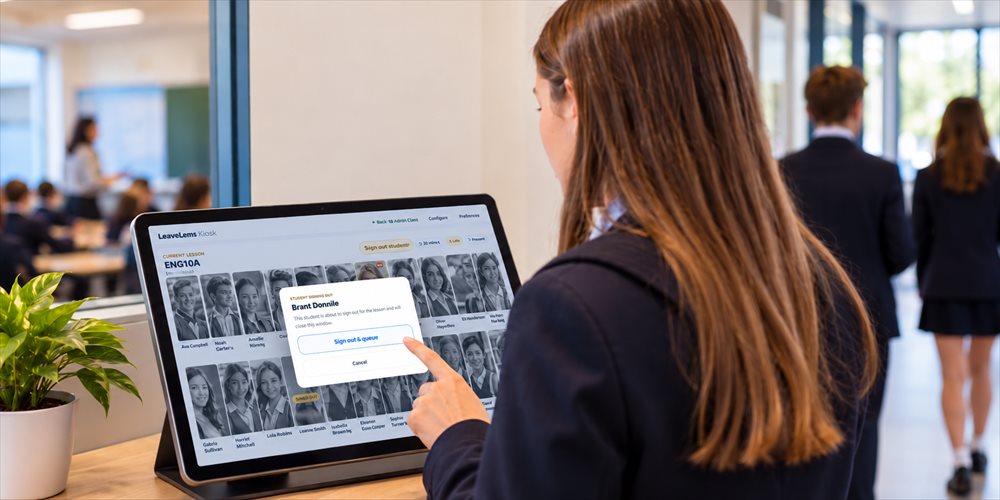
We have recently been working on a new feature for LeaveLens called Kiosk Mode, which gives schools another way to manage students leaving and returning to classrooms without constantly interrupting teaching.
Managing student movements during lessons is a routine part of school life. Whether a student needs to visit the bathroom, get a drink, attend student support services or leave the classroom for another reason, teachers are often responsible for recording when the student leaves and when they return.
While these individual interruptions might seem minor, they can add up throughout a lesson, particularly when teachers are managing multiple student requests alongside delivering their curriculum.
Kiosk Mode provides an alternative approach, allowing schools to manage these movements through a shared, self-service device while continuing to maintain accurate student movement records.
How Does LeaveLens Kiosk Mode Work?
The idea is fairly simple. Rather than a teacher having to manually log every student out and back in, students can use a shared iPad, tablet or computer to manage their own movements, either by selecting their name or scanning their student ID card.
When a student leaves or returns, their movement is recorded within LeaveLens, allowing the school to maintain a consistent record of time spent outside the classroom.
This approach gives students greater independence in managing their movements while reducing the administrative demands placed on teachers during lessons.
Three Different Kiosk Options for Schools
We have developed three different kiosk options to accommodate how schools operate. Not every school manages classrooms and student movements in the same way, so the intention was to provide flexibility rather than a single fixed approach.
Teacher Kiosk
A Teacher Kiosk follows a teacher's timetable, automatically displaying the students in their current class.
This could be particularly useful for teachers who move between classrooms throughout the day or who prefer to keep a dedicated device available for students to sign themselves out and back in. Rather than selecting the class manually for each lesson, the kiosk follows the teacher's scheduled classes.
Room Kiosk
A Room Kiosk stays in a particular classroom and adjusts to whichever class is timetabled into that room.
For schools with shared teaching spaces, this means a device can remain in the classroom while different teachers and students use it throughout the school day. The kiosk adapts to the room's timetable rather than being associated with an individual teacher.
Whole School Kiosk
A Whole School Kiosk can be positioned in a central location, allowing students to log their movements regardless of which class they are attending.
This option could suit schools wanting a centralised student sign-out and return point, particularly in shared learning areas or supervised locations where students from different classes may need to access the same device.
Simple Setup Using Existing School Devices
One of the things we wanted to achieve was to make Kiosk Mode as straightforward as possible for schools to implement.
Staff can configure a kiosk and connect a device using a QR code or activation code, without needing to install additional software. The kiosk operates through the LeaveLens web platform, making it suitable for compatible iPads, tablets and computers already available within schools.
Schools retain control over whether Kiosk Mode is enabled, how kiosks are configured and which devices are authorised to connect.
Student Movement Tracking and Lost Learning Time
Importantly, Kiosk Mode is not a separate student sign-out system. It integrates directly with the existing LeaveLens platform.
All student movements continue to contribute to the reporting and analytics available to schools, including:
- How frequently individual students leave their lessons.
- How long students spend outside the classroom.
- Patterns of movement across classes, subjects and year levels.
- Repeated or prolonged absences that may warrant further attention.
- The amount of learning time students spend away from their scheduled lessons.
Schools can therefore introduce student-managed sign-outs without losing the visibility that comes from consistent classroom movement records.
This information can help staff identify patterns, support conversations around student accountability and better understand how time outside the classroom affects learning opportunities.
Reducing Classroom Interruptions While Maintaining Oversight
We can see Kiosk Mode being particularly useful for schools with shared learning spaces, classrooms where teachers regularly move between rooms, or simply teachers who want to reduce the number of interruptions during lessons.
There is also an opportunity for schools to encourage students to take greater responsibility for recording their own movements, while teachers continue focusing on delivering their lessons.
Of course, Kiosk Mode is not intended to replace teacher oversight or the processes schools already have in place for managing student movement. Rather, it provides another way of recording those movements, depending on the needs of the school and its classrooms.
Another Option for Schools Using LeaveLens
Kiosk Mode extends the existing classroom movement tracking functionality within LeaveLens by giving schools more flexibility in how student exits and returns are recorded.
Some schools may prefer teachers to continue managing student movements directly. Others may find that self-service kiosks are particularly effective in certain classrooms, shared spaces or central locations.
The intention is to support both approaches, allowing schools to choose what works best for their staff, students and learning environments.
We're interested to see how different schools might use Kiosk Mode in practice and where it could make the greatest difference to day-to-day classroom management.
More information about LeaveLens and its existing student movement tracking features is available at leavelens.com.au .